
We cut our API's memory bill by 70%. The culprit was a browser.

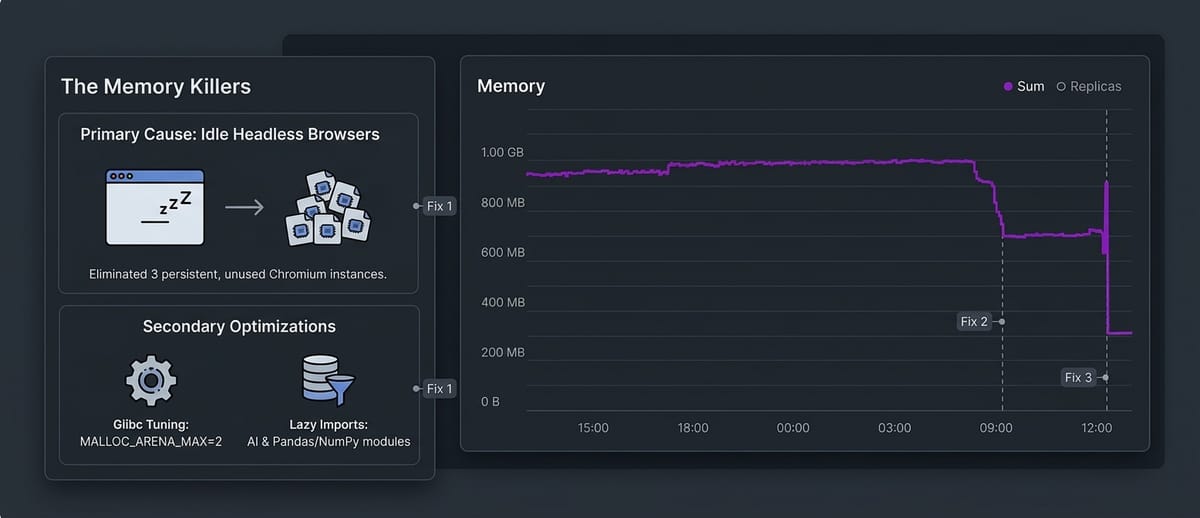
Our production API shed about 70% of its memory in a single deploy. No new servers, no rewrite, no clever caching. Most of the drop came from closing web browsers that nobody was using.
This is the story of how we found them, why they were there, and the two smaller fixes we shipped alongside.
What Olareport does, and why it prints so much
Olareport is a school management platform. Schools use it for student records, attendance, assessments and computer-based exams, fees, lesson notes, report cards, transcripts and certificates.
A lot of that work ends as a document someone downloads or prints. A report card, a transcript, a certificate, a lesson note, an exam result slip. We design each one in HTML and print it to PDF with a headless Chromium browser driven by Playwright. Same layout engine as the browser, so what a teacher previews is exactly what the parent receives.
That choice is great for fidelity. It turned out to be expensive in a way we didn't notice for a while.
The symptom: a bill driven by RAM
We run on Railway, which bills for the memory a service actually uses. When the invoice climbed, the breakdown pointed at one line: memory, and mostly on our main API service, which we call centra.
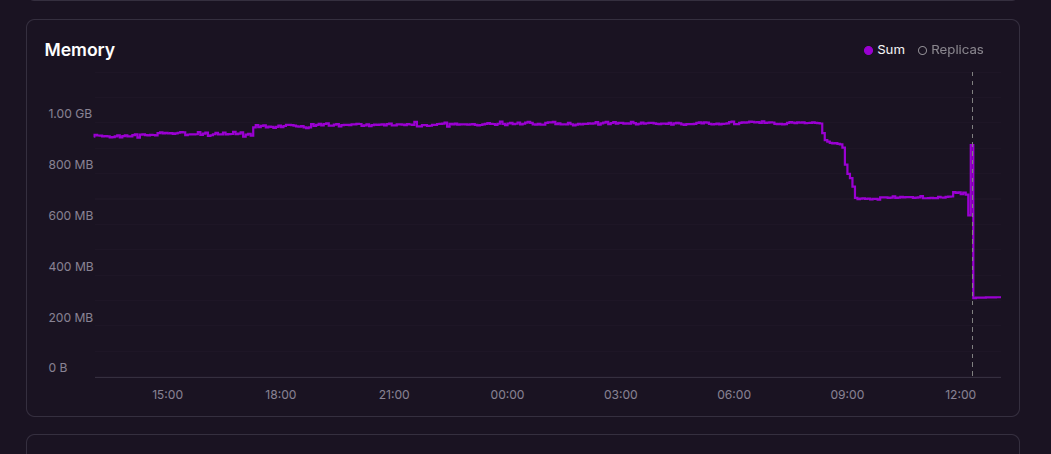
The memory graph for production told the story at a glance. Centra sat between 900 and 970 MB for most of the day, flat and slightly creeping upward, even at quiet hours. For a Python API serving a school platform, that felt far too high, and it never came back down.
The investigation: who is holding the memory?
The first useful fact was boring: centra runs a single Uvicorn worker behind Caddy. No worker pool multiplying the cost. So the memory belonged to one Python process and whatever it had started.
We measured the baseline first. Importing the app, before it served a single request, took about 390 MB. That is a lot, but it is a fixed cost, and it didn't explain 680 MB.
The real answer was in a comment that mentioned a "shared Chromium runtime". Three features each kept their own headless browser as a module-level singleton:
- converting uploaded Word curricula to PDF
- rendering verified report cards on demand
- exporting lesson notes
Each one launched Chromium the first time it was used and never closed it. We measured one idle browser at about 350 MB of resident memory. Once those three features had each been used once, the process could be paying for three browsers that sat there doing nothing until the next deploy.
Three other paths (transcripts, report rendering, certificates) did the opposite: they launched a brand-new browser for every request and closed it afterwards. No leak, but every concurrent request stacked another few hundred MB on top.
Fix 1: one browser, and it goes to sleep
We replaced all six paths with one shared runtime per process. It starts Chromium lazily on the first render and closes it after 60 seconds without one. The next render pays about a second to relaunch. For a school platform, where PDFs come in bursts (end of term, results day), that trade is easy.
The interesting part is not the timer. It is making sure the timer never closes a browser that a render is still using:
async def render_pdf(self, html, *, pdf_options=None):
    self._active_renders += 1
    try:
        await self._ensure_started()      # always takes the lock
        async with self._semaphore:       # at most 2 renders at once
            context = await self._browser.new_context()
            ...
    finally:
        self._active_renders -= 1
        self._schedule_idle_close()       # only arms when count hits 0

async def _close_when_idle(self):
    await asyncio.sleep(self._idle_timeout)
    async with self._lock:
        idle_for = time.monotonic() - self._last_release
        if self._active_renders == 0 and idle_for >= self._idle_timeout:
            await self._close_locked()
Three details carry the correctness:
- The in-flight counter goes up before the browser check, so an idle close that wakes up mid-request sees a non-zero count and backs off.
- Starting the browser always takes the same lock as closing it. Without that, a render could grab a browser that an idle close is halfway through tearing down.
- Idle checks are never cancelled. Each one re-reads the time of the last finished render, so a stale timer simply does nothing.
Each caller still passes its own PDF options (landscape certificates, CSS page sizes for transcripts), so the output did not change. We covered it with tests for the idle close, the in-flight guard and the options, then confirmed with real Chromium that its processes appear on a render and disappear after the idle window.
Fix 2: stop glibc hoarding freed memory
Python on Linux allocates through glibc, which gives each thread its own memory arena. An async API with a thread pool ends up with many arenas, and freed memory often stays reserved in them instead of going back to the OS. You pay for it either way. We set one environment variable in the image:
ENV MALLOC_ARENA_MAX=2It is a well-known knob for long-running Python services, and it costs nothing to try.
Fix 3: don't load what you might not use
With the browsers gone, the baseline mattered more. Every library was imported at startup, whether or not that process would ever need it:
- pandas, numpy and openpyxl were imported for one spreadsheet feature. We moved the imports inside the functions that use them.
- pydantic-ai and the OpenAI client power our AI features: the in-app assistant, AI-drafted lesson notes and curriculum ingestion. They loaded at boot even where the assistant feature flag was switched off.
The AI change needed care, because we had made pydantic-ai a hard dependency on purpose: a broken install should fail at deploy, not on a teacher's first click. So the imports are now lazy, but if the assistant is enabled when the app boots, startup imports the whole stack anyway. Lazy where it's off, loud where it's on.
There is a limit worth stating: Python cannot unload a module. The first AI request on an instance brings that memory back until the next restart. Instances that never touch AI never pay for it.
The results
Production memory dropped about 70% right after the deploy, from roughly 950 MB (its level for most of the day before) to about 290 MB per instance of the API, and it has stayed flat since.
Change | Measured effect |
|---|---|
One shared browser, closed after 60 s idle | Up to three idle browsers gone (~350 MB each locally) |
| Less freed memory held in reserve |
Lazy pandas, numpy, openpyxl | Startup RSS 388 MB → 342 MB |
Lazy pydantic-ai and OpenAI client | Startup RSS 342 MB → 287 MB |
Production, all together | about −70% (~950 MB → ~290 MB) |
The startup figures were measured locally by importing the app and reading the process's peak memory; the production figures come from Railway's memory graph.
We also looked at what we chose not to fix. Switching our OpenTelemetry exporter from gRPC to HTTP would save about 7 MB, and it would mean reconfiguring the collector too. Not worth it. Most of what remains is FastAPI, SQLAlchemy, pydantic and the database driver: the floor for an app this size.
What we'd tell another team
- Measure before you optimise. Our instinct said "Python is heavy". The numbers said "three idle browsers". The fix for the instinct would have saved a fraction of what the measured fix did.
- A singleton is memory you rent forever. Caching an expensive resource is fine. Caching it with no way to let go means you pay for its peak, all day, on every instance.
- Lazy loading is a trade, not a free win. It moves failures from deploy time to request time. Keep a loud check where the feature is actually on.
- Know where the floor is. Once the big win landed, the remaining ideas were worth single-digit megabytes. Stopping there was the right call.
About Olareport
Olareport helps schools manage academic records, attendance, examinations, fees, report cards, transcripts and certificates from one platform, with AI to help teachers draft lesson notes from their approved curriculum. If you run a school, or you like solving problems like this one, take a look or reach out.


 Download App
